Rahul was attending an online class on his laptop while his brother was watching YouTube on the TV. At the same time, his father was working on a computer and his mother was on a video call. Suddenly, the internet became slow, and everyone started asking, “Why is the Wi-Fi so slow?”
Curious, Rahul wondered how all these devices were connected and how they shared data with each other. While searching for the answer, he discovered an important networking concept called Network Topology.
Simply put, network topology is the way computers, laptops, phones, printers, and other devices are connected in a network. The way these devices are connected affects the network’s speed, performance, and reliability.
In this TechnicalMiki guide, you’ll learn what network topology is, its types, advantages, disadvantages, and real-life examples in simple and easy-to-understand language.
⭐What is Network Topology?
At its core, network topology is the arrangement or layout of different elements (like computers, servers, switches, and routers) in a computer network. Think of it as a map showing how each device is connected to others—just as cities are connected by roads on a map, computers are connected by cables or wireless links in a network.
The design of a network topology affects how data travels between devices, how easy it is to expand the network, and how resilient it is if something fails. Understanding network topology is an essential step in building efficient and reliable networks.
⭐Why is Network Topology Important?
The way devices are connected in a network is more important than most people think. A good network topology helps your network run smoothly, makes it easier to manage, and reduces the chances of connection problems.
Here’s why choosing the right network topology matters:
- Better Performance: A well-designed topology helps data travel faster and keeps the network stable.
- Easy to Expand: As your home, office, or business grows, you can add more devices without major changes.
- Simple Maintenance: If a problem occurs, it’s much easier to find and fix the issue.
- Cost-Effective: Some topologies need less hardware and maintenance, helping you save money.
In short, the right network topology improves speed, reliability, security, and overall network performance, making it easier to manage both small and large networks.
⭐Types of Network Topologies
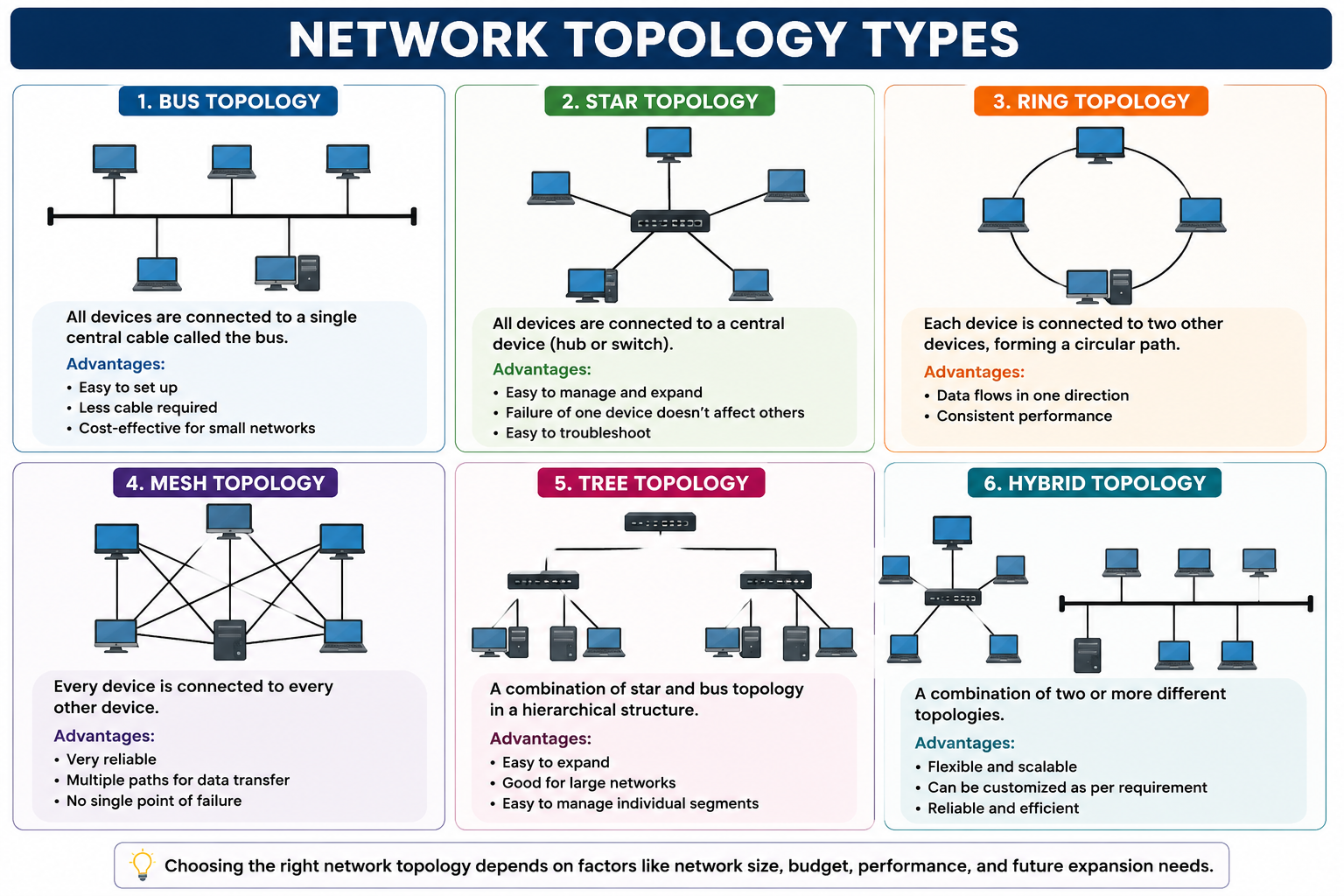
There are several basic types of network topology, each with its own strengths and weaknesses. Let’s explore the most common ones:
1. Bus Topology
In a bus network topology, all devices are connected to a single central cable, called the bus. Data travels along this cable, and each device checks whether the data is for it.
- Advantages: Easy to set up, requires less cable, and is cost-effective for small networks.
- Disadvantages: If the main cable fails, the whole network goes down. It is also less efficient as more devices are added.
2. Star Topology
In a star network topology, all devices connect to a central device, such as a switch or hub. The central device manages data traffic.
- Advantages: Easy to manage and expand, individual device failures don’t affect the entire network.
- Disadvantages: If the central device fails, the network stops working. Requires more cables.
3. Ring Topology
In a ring network topology, each device connects to exactly two other devices, forming a circular data path. Data travels in one direction around the ring.
- Advantages: Data flows in a predictable path, and performance is consistent under light loads.
- Disadvantages: If one device or connection fails, it can disrupt the whole network. Troubleshooting can be harder.
4. Mesh Topology
In a mesh network topology, devices are connected through multiple links, creating multiple paths for data transmission.
- Advantages: Very reliable—if one connection fails, data can take another route. Excellent for critical networks.
- Disadvantages: Expensive and complex to set up. Requires a lot of cabling and configuration.
5. Tree Topology
Tree network topology combines characteristics of star and bus topologies. Devices are grouped into star-configured workgroups connected to a central bus.
- Advantages: Easy to expand and manage. Ideal for large organizations.
- Disadvantages: If the main bus fails, parts of the network can stop working. Uses more cable than bus topology.
6. Hybrid Topology
Hybrid network topology uses a mix of two or more different topologies to create a flexible and scalable network.
- Advantages: Can be customized to suit unique needs, offering reliability and performance.
- Disadvantages: Design and maintenance can be more complicated and costly.
⭐Wired vs. Wireless Network Topology
Network topology can be both physical (how cables and hardware are arranged) and logical (how data flows regardless of physical arrangement). With the rise of Wi-Fi and mobile devices, wireless topologies have become common.
- Wired Network Topology: Involves physical cables connecting devices. Offers speed and security but less flexibility.
- Wireless Network Topology: Uses radio waves to connect devices. More flexible and easier to expand, but can be less secure and more prone to interference.
⭐Choosing the Right Network Topology
Selecting the best network topology depends on several factors, such as:
- The size of your network
- Your budget and resources
- The need for reliability or redundancy
- Ease of future expansion
For small offices or homes, a star topology is often chosen for its simplicity and reliability. For larger or mission-critical networks, mesh or hybrid topologies may offer the needed resilience.
⭐Network Topology in Everyday Life
Network topology is not just a technical term used by IT professionals—it’s everywhere. Your home Wi-Fi network probably uses a star topology, with all devices connected to a central router. In contrast, the internet itself is a giant example of mesh topology, with countless routers and servers interconnected for redundancy and speed.
In schools, office buildings, or hospitals, network architecture is carefully planned to ensure everyone can access resources quickly and reliably. Understanding the basics of network topology can help you troubleshoot issues, plan for growth, or simply appreciate the invisible structure behind your daily online activities.
⭐Benefits of Understanding Network Topology
Knowing about network topology brings many advantages:
- Better troubleshooting: If you know how devices are connected, finding and fixing problems becomes simpler.
- Smarter upgrades: Understanding your network helps when adding new devices or services.
- Improved security: Certain topologies offer better control over network access and monitoring.
- Cost savings: By choosing the right topology, you avoid overspending on unnecessary hardware or cables.
Future Trends in Network Topology
As technology evolves, so does network topology. Some emerging trends include:
- Software-defined networking (SDN): Allows administrators to adjust network topology using software, making networks more flexible and efficient.
- Cloud networking: With more services moving to the cloud, logical topologies are becoming more important than physical ones.
- Internet of Things (IoT): Billions of devices are being added to networks worldwide, requiring new topologies to handle the load.
- Wireless mesh networks: These are spreading in smart cities and large campuses, offering self-healing and scalable connections.
⭐Common Questions about Network Topology
How do I know which network topology to use?
Start by considering your needs: How many devices do you have? How much can you spend? How important is uptime? For most small setups, a star topology is a solid choice. For larger or more critical systems, mesh or hybrid topologies may offer the reliability you need.
Can I mix different types of network topology?
Absolutely! Hybrid topologies are popular because they allow you to use the strengths of multiple designs. For example, a university might use a tree topology for its classrooms, but a mesh topology for its data center.
Does network topology affect internet speed?
Yes, the layout of your network can impact speed, especially as it grows. Efficient topologies minimize bottlenecks and make sure data reaches its destination quickly.
Are wired or wireless networks better?
Both have their advantages: wired networks are often faster and more secure, but wireless networks are easier to set up and expand. Your choice may depend on your environment and needs.
⭐Key Takeaways
- Network topology is the arrangement of devices and connections in a computer network.
- The main types include bus, star, ring, mesh, tree, and hybrid topology.
- Choosing the right network topology affects performance, scalability, and reliability.
- Trends like SDN, cloud, IoT, and wireless mesh are shaping the future of networking.
- Understanding network topology is essential for anyone planning, managing, or using a network.
⭐Conclusion
Network topology may sound like a complex technical term, but it simply explains how different devices like computers, routers, and other network devices connect and communicate with each other.
Choosing the right network topology helps create a faster, more reliable, and easier-to-manage network—whether it’s for a home, school, or business. Understanding these basics can help you make better decisions when building or managing a network.
At TechnicalMiki, our goal is to make technology simple and easy for everyone. Whether you are a student, beginner, or tech lover, learning concepts like network topology helps you understand the digital world around you.
Keep learning and stay connected with TechnicalMiki for simpler and more useful Article.